
CFDs and Spread Bets are complex instruments and come with a high risk of losing money rapidly due to leverage. 72.65% of retail investor accounts lose money when trading CFDs and Spread Bets with this provider. You should consider whether you understand how CFDs and Spread Bets work and whether you can afford to take the high risk of losing your money.


 Login


SEARCH
-
Search query too short. Please enter a full word or phrase.
-

Keywords
Popular Search


SEARCH
-
Search query too short. Please enter a full word or phrase.
-
Keywords
Popular Search



Best Trading App in the UK: Six Broker Apps for Trading on Your Phone

Vantage Editorial Team >
6 November 2026 | Academy | 16 min read
Vantage Editorial Team >
Vantage is a global, multi-asset broker with a team of in-house writers and market analysts who produce educational and insightful trading content for traders of all levels.

A growing share of UK traders check positions, adjust stops and read the morning news without ever opening a laptop. For that to work, the app has to carry the whole account: prices, charts, order tickets, alerts and the funding screens, on a display a few inches wide.
The apps below all come from brokers authorised by the Financial Conduct Authority (FCA), and each has a different focus. One is built around alerts, another lets you rebuild the home screen, and several let you spread bet as well as trade Contracts for Difference (CFDs). We look at six of them, including the Vantage UK App, and explain which kind of trader each tends to suit.
This comparison covers the mobile experience only, not trading costs, and it is general information rather than advice. App features change often, so check the current store listing before you download.
Key Points
- A good trading app for you is one whose charts, alerts and order ticket work comfortably on your own phone, so the features you use daily matter more than the length of the feature list.
- UK traders should also check whether an app supports spread betting, because some FCA-authorised brokers offer only CFDs.
- FCA retail protections, including leverage limits and negative balance protection, apply in the app exactly as they do on desktop, and leveraged trading carries the same risk on a small screen.
UK Trading Apps at a Glance
Features below are taken from each firm’s UK app page, help centre or UK App Store listing on 30 September 2026.
| App | Key Feature | Charting | Alerts | Login Security | Spread Betting |
| Vantage UK App | Spread bets and CFDs with in-app market news | Several chart types, indicators, drawing tools, 10 timeframes | Price alerts, custom push notifications | Two-factor authentication | Yes |
| IG | Technical and economic event alerts | In-app charts and trading from the chart | Price, economic event and indicator alerts by push, SMS or email | Two-factor authentication; fingerprint or Face ID | Yes |
| CMC Markets | A dashboard you can rearrange | 25+ indicators, 15 drawing tools | Push, text message or email | Two-factor authentication and biometric login | Yes |
| Capital.com | Reviewing trades after they close | Stop-loss and take-profit set from the chart | Price alerts | Not stated | Yes |
| eToro | Copying other traders | Charts across web and mobile | Not stated | Two-factor authentication by push or SMS | No |
| XTB | One platform on phone and desktop | xStation mobile charts | In-platform price alerts only | Not stated | No |
Table 1: Six UK trading apps compared on charting, alerts, login security and spread betting
“Not stated” means the firm’s UK pages did not mention the feature. It may still exist, so ask the firm if it matters to you.
How We Assessed the Apps
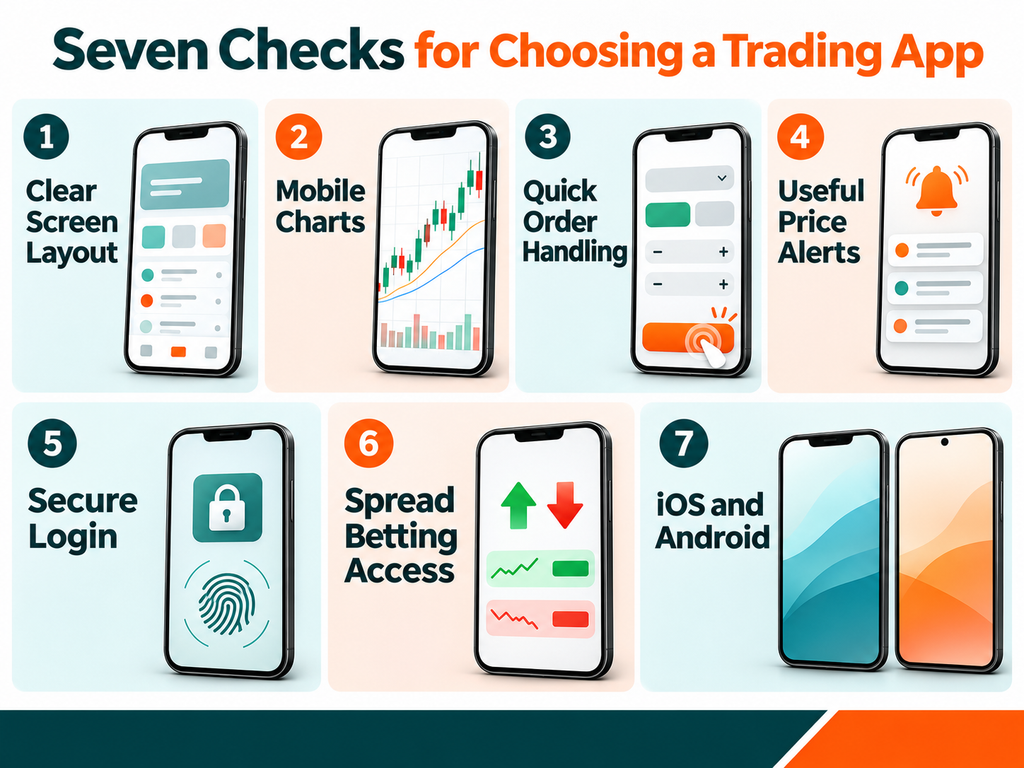
We judged each app on how well it handles a trading account away from a desk, using only what the broker publishes for UK clients.
- Screen Layout: Whether watchlists, positions and menus are easy to find, and whether the layout can be changed.
- Charts on Mobile: The indicators, drawing tools and timeframes available inside the app, and whether you can trade from the chart.
- Order Handling: How quickly you can place a trade and attach a stop-loss or take-profit.
- Alerts: Which events can trigger an alert, and whether it arrives by push notification, text message or email.
- Login Security: Two-factor authentication (2FA) and biometric login, where the firm confirms them.
- UK Products: Whether spread betting is available alongside CFDs.
- Device Support: Whether the app runs on both iOS and Android.
1. Vantage UK App
The Vantage UK App, from Vantage Global Prime LLP (FCA FRN 590299), puts spread betting and CFD trading in one app for iOS and Android. It covers more than 900 assets and handles deposits, withdrawals and account management as well as trading.
- Charting: You can switch between chart types, add indicators and drawing tools, and view 10 timeframes.
- Orders: Several order types are available, so you can set a stop-loss or take-profit when you open a position.
- Market Information: An economic calendar, market news and daily commentary sit inside the app.
- Alerts and Security: Price alerts and custom push notifications keep you updated, and two-factor authentication protects your login.
- Demo Mode: A demo account with $100,000 in virtual credit lets you learn the app before using real funds.
If you prefer MetaTrader or TradingView, Vantage UK also supports MT4, MT5 and a TradingView connection alongside the app.
2. IG App
IG’s alerts go further than simple price triggers. UK clients can set price alerts, economic event alerts and technical indicator alerts based on studies such as moving averages, MACD, RSI and Bollinger Bands, delivered by mobile push, SMS, email or inside the platform [2].
The app itself offers in-app charts, trading from the chart and news [1]. Its UK App Store listing mentions fingerprint and Face ID login and a £10,000 demo balance [3], and IG uses one-time passcodes for two-factor authentication. Spread bets and CFDs can both be traded [1].
3. CMC Markets App
CMC Markets lets you resize, remove or reposition the tiles on its app dashboard, so the first screen shows the markets and data you check most [4]. Charts include more than 25 technical indicators and 15 drawing tools, and you can trade directly from them [4].
Notifications can reach you by push, text message or email, and the app supports 2FA and biometric login [4]. A Reuters news feed, Morningstar research, an economic calendar and client sentiment data are built in, and spread betting sits alongside CFDs [4].
4. Capital.com App
Capital.com’s app includes a post-trade review, so you can look back at how a position was opened, managed and closed [5]. Price alerts, stop-losses and take-profits can be set from the chart, and the firm lists more than 5,500 CFD markets alongside an artificial intelligence (AI) assistant [5].
Capital Com (UK) Limited offers spread bets as well as CFDs to UK clients, and the app is available on iOS and Android [5][6].
Capital.com also lists TradingView among its platform integrations [5].
5. eToro App
eToro (UK) Ltd is authorised by the FCA under FRN 583263 [7]. Its best-known feature is CopyTrader, which lets you mirror the positions of other users, and eToro says it works in the demo portfolio exactly as it does with real funds [7].
You can switch between a real and a virtual portfolio from the same app, and two-factor authentication can be completed by push notification or SMS [7][8]. eToro does not appear to offer spread betting in the UK.
Copying another trader does not remove risk. Their past results are not a reliable indicator of future performance, and you can lose the money you allocate.
6. XTB App
XTB Limited (FCA FRN 522157) runs every account on its own xStation platform, so the mobile app mirrors what you see on the web [9]. The app is available on iOS and Android [9].
Price alerts are shown inside xStation only, rather than by email or text message [10], which suits traders who keep the app open. XTB states that it does not offer spread betting [11], so UK clients trade CFDs or invest in shares and ETFs.
Broker App or MetaTrader and TradingView on Mobile?
Most UK brokers let you trade on your phone in two ways: through their own app or through the mobile version of a third-party platform.
- Broker Apps: Keep trading, funding, alerts and research in one place, and are usually where spread betting is easiest to access.
- MetaTrader Mobile: The MT5 mobile app supports hedging and netting, Market Depth, the full set of order types and built-in indicators on iOS and Android [12]. It suits traders who already run MetaTrader on desktop.
- TradingView Mobile: Several UK brokers, including Vantage, connect accounts to TradingView, so charts and orders can be managed from the TradingView app.
Plenty of traders keep both: a broker app for alerts and funding, and a MetaTrader or TradingView app for trading on familiar screens.
Picking a UK Trading App for Your Routine
No app suits every UK trader. Start with the tasks you will do most often on your phone, such as checking alerts, adjusting a stop or reading the news, and see which app handles them most comfortably. If you want to spread bet, confirm the app supports it before opening an account.
To see the Vantage UK App’s charting, alerts and spread betting features in more detail, visit our Vantage UK App page.
Trading on a phone makes it quicker to act, but leverage can magnify both gains and losses. Setting a stop-loss and keeping positions to a size you can manage matters on every screen.
FAQs: Trading Apps in the UK
Here are answers to questions UK traders often ask before choosing a trading app.
Which trading app is best for beginners in the UK?
It depends on what you want to practise first. A beginner may find it helpful to choose an app with a demo account and a clear layout. The Vantage UK App includes a demo with $100,000 in virtual credit, IG’s app offers a £10,000 demo balance [3] and eToro lets you flip to a virtual portfolio [7]. Try the demo before funding a live account.
Can I spread bet on a mobile app in the UK?
Yes, with some brokers. The Vantage UK App, IG, CMC Markets and Capital.com all offer spread betting alongside CFDs [1][4][6]. XTB states that it does not offer spread betting [11]. Spread bets are leveraged in the same way as CFDs, so they carry a high risk of losing money quickly, and tax treatment depends on your personal circumstances.
Are UK trading apps safe to use?
Login security helps protect access to your account. CMC Markets states its app supports 2FA and biometric login [4], and IG’s listing mentions Face ID and fingerprint login [3]. Only download an app from the official store link on the broker’s website, and check the firm on the FCA Register. Security features do not protect you from trading losses.
Do UK trading apps offer copy trading?
Some do. eToro is known for CopyTrader, although its UK availability should be confirmed with the firm [7]. Vantage does not offer copy trading to UK clients. If you do copy another trader, remember that their past results are not a reliable guide to the future, and you can lose the money you allocate to them.
What kinds of alerts can I set on a trading app?
This varies by app. IG supports price, economic event and technical indicator alerts by push, SMS or email [2], CMC Markets sends notifications by push, text or email [4], and the Vantage UK App offers price alerts and custom push notifications. XTB shows alerts within xStation only [10]. Make sure notifications are switched on in your phone settings.
Should I use a broker app or the MT4 or MT5 app?
It depends on your habits. A broker app usually brings together trading, funding, research and, in the UK, spread betting. The MT5 app suits those already using MetaTrader who want features such as Market Depth and a choice of hedging or netting on the move [12]. Many traders install both and use each one for a different purpose.
References
- Trading Apps: Try the UK’s Best Mobile Trading App – IG UK https://www.ig.com/uk/trading-platforms/trading-apps Accessed on 30 September 2026
- Free Trading and Forex Alerts for UK Traders – IG UK https://www.ig.com/uk/trading-platforms/trading-alerts Accessed on 30 September 2026
- IG: Trading. Investing. Crypto – App Store https://apps.apple.com/gb/app/ig-trading-investing-crypto/id406492428 Accessed on 30 September 2026
- Mobile Trading App – CMC Markets https://www.cmcmarkets.com/en-gb/trading-platforms/mobile-trading-app Accessed on 30 September 2026
- Mobile Trading App | CFD Trading Apps – Capital.com UK https://capital.com/en-gb/trading-platforms/mobile-apps Accessed on 30 September 2026
- Open a Free Demo Trading Account – Capital.com UK https://capital.com/en-gb/trading-platforms/demo-account Accessed on 30 September 2026
- Demo Trading Account | Practise investing for free – eToro https://www.etoro.com/trading/demo-account/ Accessed on 30 September 2026
- How does two-factor authentication (2FA) via push notification work? – eToro Help https://help.etoro.com/s/article/How-does-two-factor-authentication-2FA-via-push-notification-work?language=en_GB Accessed on 30 September 2026
- Forex mobile trading app – XTB https://www.xtb.com/en/mobile-trading-app-kb Accessed on 30 September 2026
- xStation 5 price alerts – XTB https://www.xtb.com/en/help-center/our-platforms/xstation-5-price-alerts Accessed on 30 September 2026
- Spread Betting: A Detailed Guide – XTB https://www.xtb.com/en/education/spread-betting-a-detailed-guide Accessed on 30 September 2026
- MetaTrader 5 Mobile Trading – MetaQuotes https://www.metatrader5.com/en/mobile-trading Accessed on 30 September 2026
RISK WARNING: CFDs and Spread Bets are complex instruments and come with a high risk of losing money rapidly due to leverage. 72.65% of retail investor accounts lose money when trading CFDs and Spread Bets with this provider. You should consider whether you understand how CFDs and Spread Bets work and whether you can afford to take the high risk of losing your money.
Copy trading involves risk. The past performance of any trader you copy is not a reliable indicator of future results, and you may lose some or all of the funds you allocate.
Disclaimer: The information is provided for educational purposes only and doesn’t take into account your personal objectives, financial circumstances, or needs. It does not constitute investment advice. We encourage you to seek independent advice if necessary. The information has not been prepared in accordance with legal requirements designed to promote the independence of investment research. No representation or warranty is given as to the accuracy or completeness of any information contained within. This material may contain historical or past performance figures and should not be relied on. Furthermore estimates, forward-looking statements, and forecasts cannot be guaranteed. The information on this site and the products and services offered are not intended for distribution to any person in any country or jurisdiction where such distribution or use would be contrary to local law or regulation.
Editorial Disclosure: This guide is published by Vantage. Vantage products are included in this comparison. The rankings reflect our editorial assessment based on the criteria described below and are intended for informational purposes only. They are not an independent ranking or a personal recommendation.
Key Points In This Article

Latest Academy Articles


Market News Tags
- # Asian Markets News Today
- # Crude Oil News Today
- # Earnings News Today
- # Economic News Today
- # Featured News
- # Federal Reserve News
- # Commodity Market News
- # Interest Rate News
- # Financial News
- # Forex News Today
- # Gold News Today
- # Market News Today
Related Articles
- Largest Stock Exchanges in the World: Top 10 by Market Capitalisation in 2026
- Alphabet (GOOGL) Stock in Q3 2026: Latest Results, Analyst Targets and How UK Traders Trade It
- Amazon (NASDAQ: AMZN) Shares Q3 2026 Earnings: What It Might Mean For UK Traders & Investors
- CFD Trading Explained: What It Is and How to Trade CFDs in the UK
- Negative Balance Protection in the UK: How It Works and What It Doesn’t Cover
- 10 CFD Trading Strategies UK Traders Should Know
- Candlestick Patterns: How to Read 18 Patterns on Price Charts
- Spread Betting vs. CFDs: What’s The Difference?