

 Login
Login



 Updated
If you want to learn how to paper trade on TradingView, start with the number that matters most: your virtual balance. TradingView’s paper trading module lets you reset that balance to any figure you choose, and Vantage Markets demo accounts default to $100,000 in virtual funds—so you can size your TradingView practice sessions to match the same starting capital you would use on a live CFD account.
Paper trading on TradingView is for you if you want to test entries, exits, and position sizing without risking real capital, whether you are new to trading or refining an existing approach. The module is built directly into TradingView’s charting interface and mirrors real-time market conditions, so the habits you build in the simulator carry across to the strategies you eventually take live.
In this article, we walk you through how to set up paper trading on TradingView, the features worth knowing before you place your first simulated trade, and how to use the practice to prepare for live CFD trading with Vantage Markets.
Key Points
- TradingView’s paper trading simulator is free to use, and lets you reset your virtual balance to any figure useful for matching it to your intended live trading capital.
- The module mirrors live market data and order types, letting you place market, limit, and stop orders exactly as you would on a real account.
- Reviewing your Performance Summary and Win Rate tabs after each session shows you what is—and is not—working before you scale up.
- Realistic lot sizing, session timing, and limited account resets make the simulation more transferable to live trading conditions.
- Connecting a Vantage Markets demo account to your TradingView profile lets you rehearse CFD-specific mechanics, such as spreads and stop-outs, alongside the simulator.
What Is Paper Trading?
Paper trading simulates trades without using real money. It lets you place hypothetical orders and track market outcomes in real time, helping you test strategies and build trading discipline in a risk-free environment.
Why It Matters For Experienced Traders
Even seasoned traders use paper trading to test new approaches or unfamiliar markets. It offers a way to:
- Validate new strategies without financial exposure
- Build familiarity before scaling to larger positions
- Analyse potential performance outcomes under different market conditions
Paper trading is not only for beginners; it’s a tool for continuous improvement at any experience level.
What Is Paper Trading on TradingView?
As one of the most popular charting and analysis platforms for traders and investors, TradingView includes a built-in paper trading simulator you can access at no extra cost.1 It mirrors real-time market conditions, letting you practise strategies, manage simulated trades, and track performance from within the platform’s interface.
For a fuller walkthrough of the platform itself, read Vantage Markets’ beginner’s guide to TradingView.
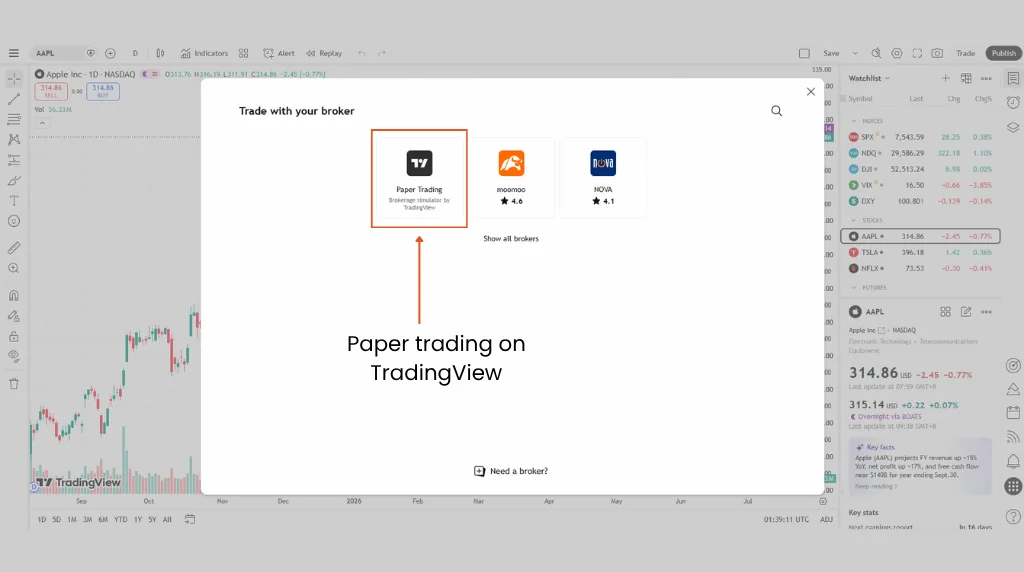
4 Noteworthy Features of TradingView’s Paper Trading Module
- Real-Time Market Data: Simulate trades based on live prices and movements.
- Customisable Balance: Set your virtual capital to match your real-world account goals.
- Full Trading Panel: Use advanced order types and position management tools.
- Cross-Device Access: Practise from your desktop or mobile via the TradingView app.
Is Paper Trading the Same As Live Trading?
While paper trading mimics real conditions, it lacks the emotional and psychological pressures of trading with real money (aka live trading). When paper trading, executions are typically instant and free of factors that may affect live trading outcomes, such as slippage, spreads, or liquidity issues.
Still, it is a valuable training ground before risking actual capital.
6 Key Features of Paper Trading Every Trader Should Know
Paper trading provides a realistically interactive environment for traders to refine their skills. Here are six features that make it a useful tool for both beginners and experienced traders:
1. Simulated Order Execution
Paper trading on TradingView allows you to place market, limit, and stop orders in a simulated environment, mirroring how they would behave in real market conditions. This helps you gain practical experience and better understand how each order type works without risking actual capital.
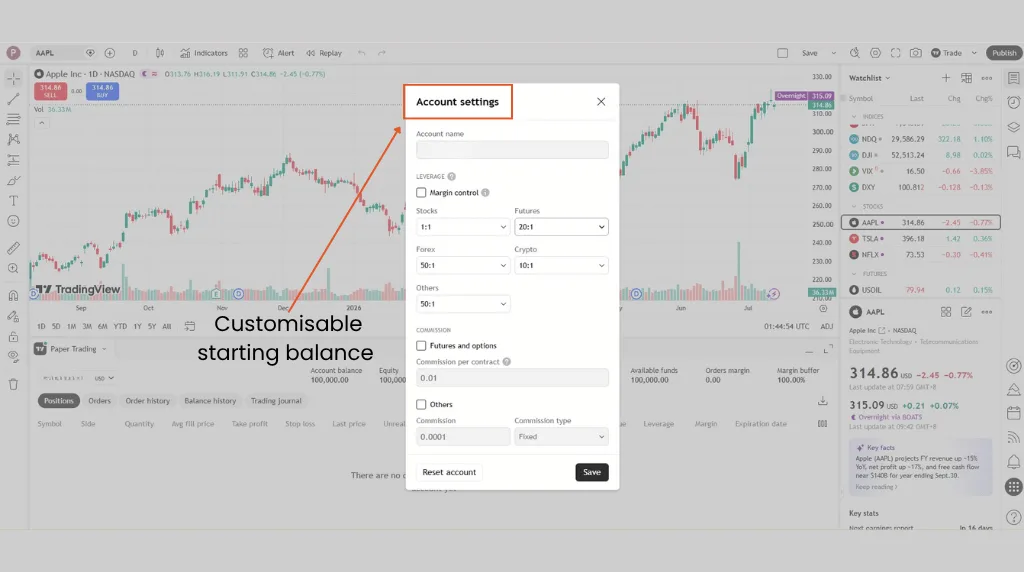
2. Customisable Starting Balance
You can reset your TradingView paper trading account to any virtual balance, allowing you to practise with an amount similar to your intended live trading capital. This creates a more realistic and personalised trading experience.
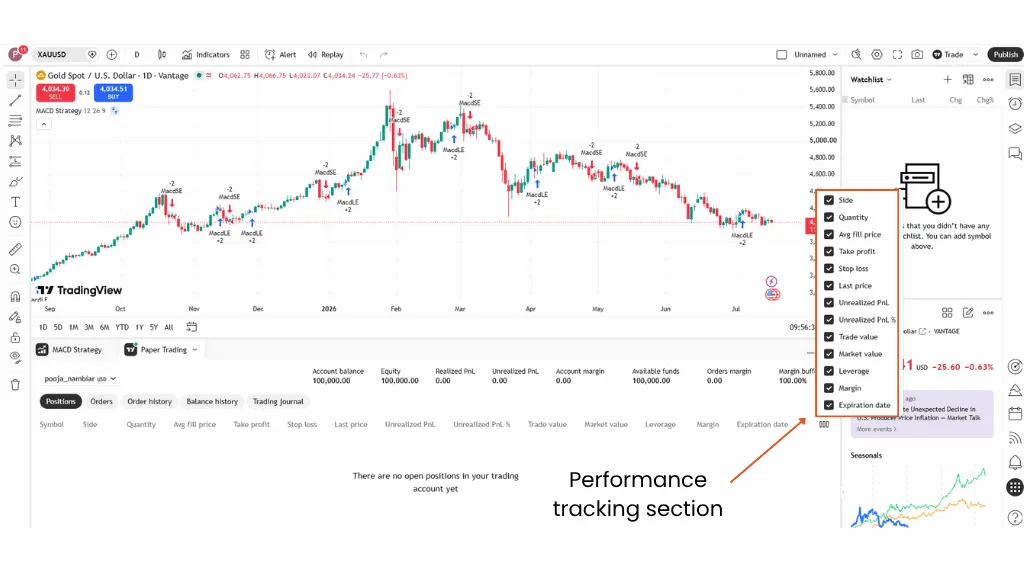
3. Performance Tracking
TradingView automatically logs each simulated trade’s outcome, letting you review your performance over time. On the Performance Summary tab, this includes metrics such as win rate2, net profit, gross profit/loss, max profit/loss, and buy & hold return3—all based on simulated results, not real capital.
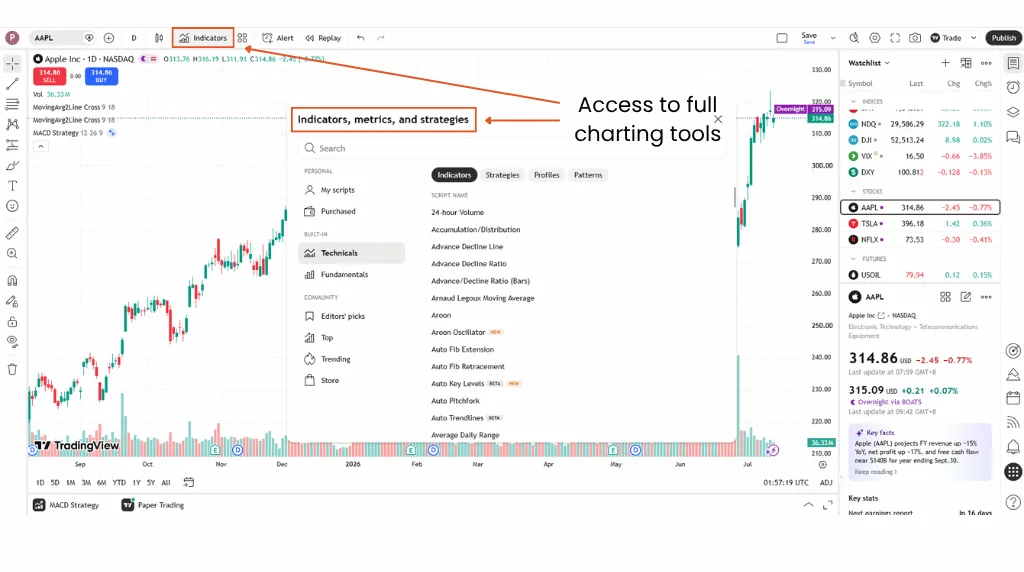
4. Access to Full Charting Tools
While paper trading, you still have full access to TradingView’s advanced charting capabilities, indicators, and drawing tools that support technical analysis4 and strategy development.
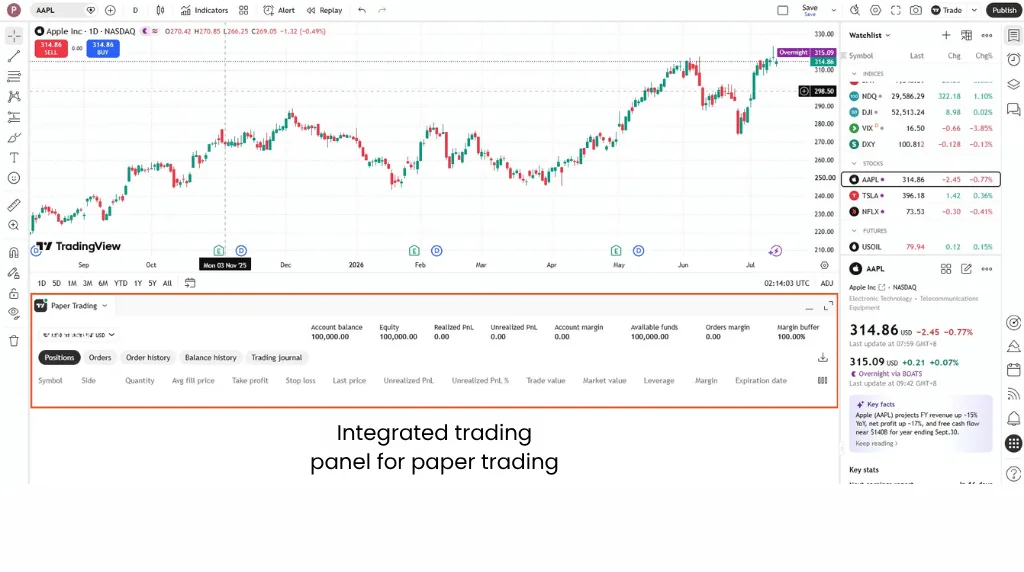
5. Integrated Trading Panel
TradingView’s built-in trading panel offers real-time trade management, including position sizing, simulated profit and loss tracking, and order editing. It closely replicates the experience of managing a live trading account, making it useful for practice and strategy testing.
6. No Risk of Financial Losses
With paper trading on TradingView, there is no real capital at stake. This allows you to test strategies, learn from mistakes, and develop trading discipline without the stress of losing money.
How to Set Up Paper Trading on TradingView
Getting started with paper trading on TradingView is pretty straightforward. Follow these steps to set up your simulation environment and begin trading with virtual funds.
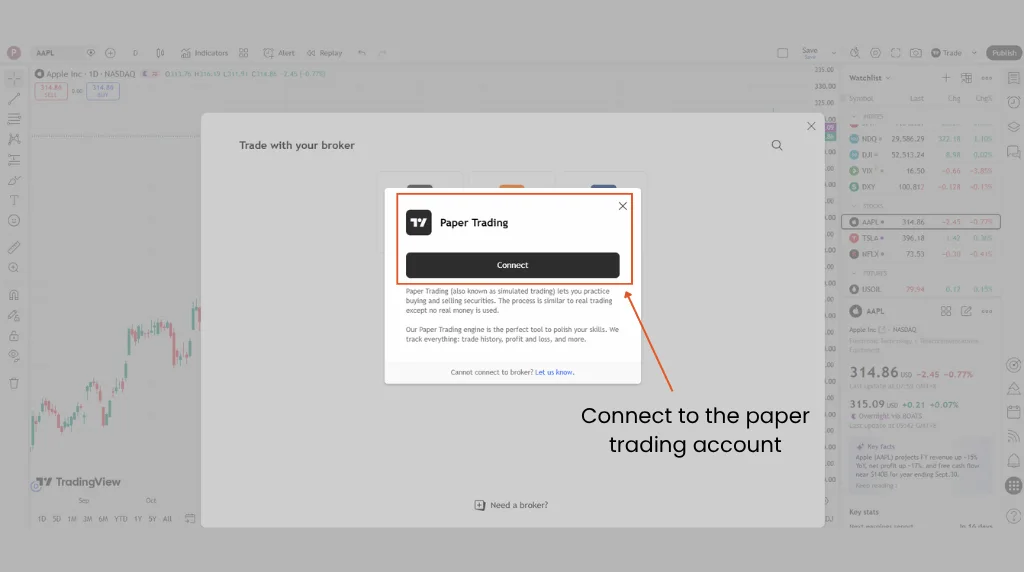
1. Connect to the Paper Trading Account
- Log in to your TradingView account.
- Click on the Trading Panel tab at the bottom of your chart window.
- Select Paper Trading by TradingView and click Connect.
This creates a simulated trading environment with a default virtual balance.
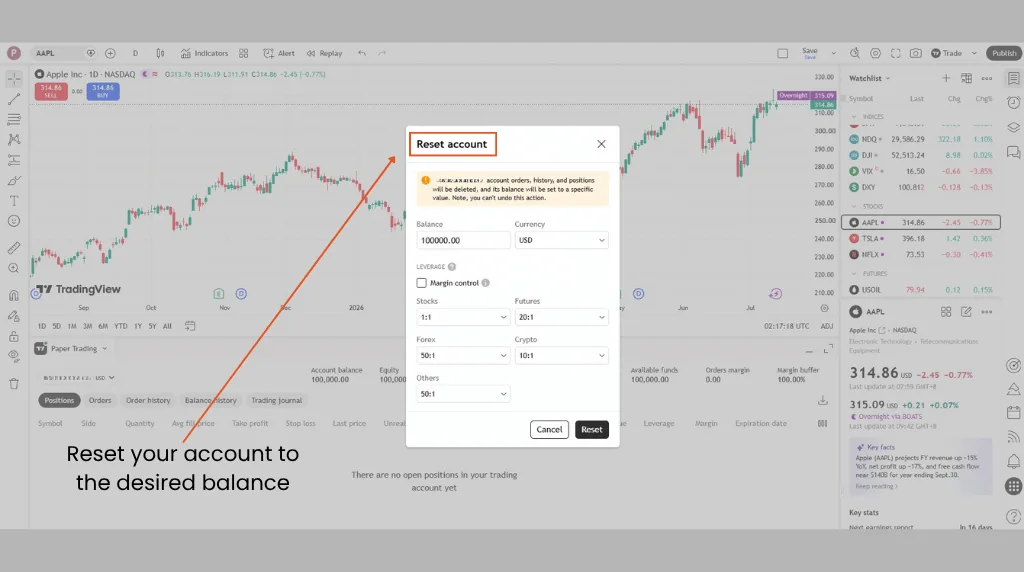
2. Reset Your Account to the Desired Balance
To tailor the experience to your personal trading goals:
- Click on the account settings icon next to the paper trading connection.
- Choose Reset account.
- Enter your preferred starting balance and click Reset.
This helps ensure your practice environment reflects the size of the account you plan to trade with.
3. Understanding the Trading Panel
The trading panel replicates the key functions of a live brokerage platform. Through TradingView’s order ticket5, you can:
- Place market, limit, and stop orders
- Monitor open positions and order history
- Review your account’s equity, margin usage, and simulated profit and loss
Becoming familiar with this interface prepares you for live trading workflows.
Once you are comfortable placing simulated orders, backtesting on TradingView can be a useful next step for evaluating your trading ideas against historical data.
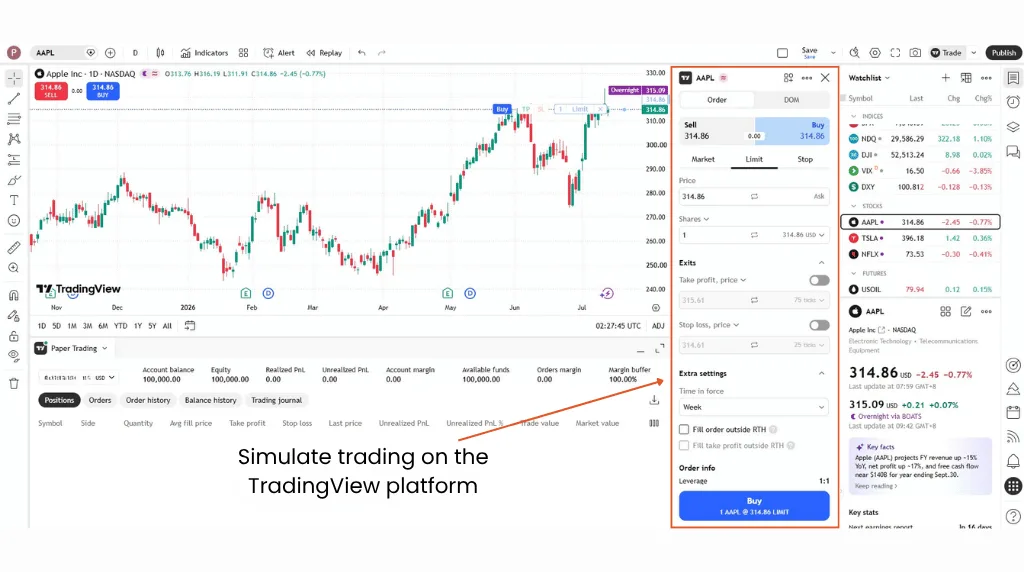
4. Simulate Trading
You can now begin placing simulated trades directly from your charts. Use the Trade menu in the trading panel to:
- Enter and exit trades
- Modify or cancel orders
- Set take-profit and stop-loss levels
Treat this process as if you were using real money to build proper trading habits.
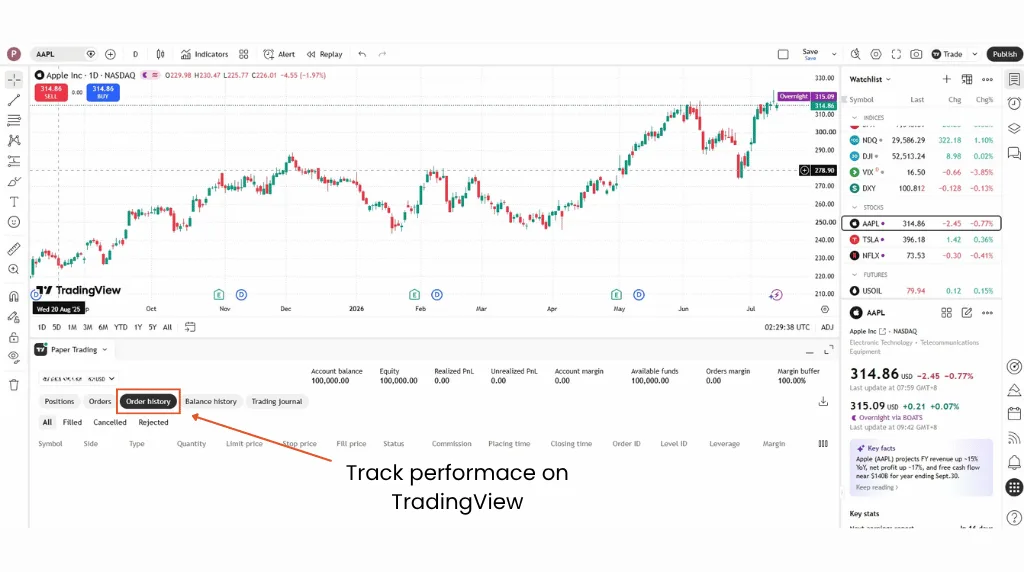
5. Track Performance
TradingView automatically records your trade history. Use the Order History tab in the trading panel to:
- Review closed trades
- Analyse your simulated profit and loss for each trade
Regularly reviewing your performance is critical to improving your strategy.
Related Article: 3 Fundamental Indicators on TradingView to Improve Your Trading Strategies
6. Reset or Adjust Your TradingView Account
You may wish to reset your account periodically to test new strategies or simulate different capital scenarios. However, avoid doing so too often, as it can distort your long-term performance data and reduce the realism of your practice.
How to Get Real Trading Experience with Paper Trading on TradingView
To make the most of TradingView’s paper trading feature, it helps to approach it as seriously as you would a live trading account. Below are three practical ways to maximise your learning and simulate real trading conditions:
1. Choose Realistic Lot Sizes
Avoid the temptation to trade oversized positions just because you are using virtual funds. Choose lot sizes that reflect your actual capital and risk tolerance, applying the same risk management habits you would use on a live account.
2. Time Your Trades Properly
Practise entering trades during the same market hours you would follow in a real scenario. For instance, if you intend to trade the EUR/USD pair, simulate trades during the most active sessions, typically the London and New York overlap.
3. Limit Account Restarts
While TradingView allows you to reset your virtual balance at any time, doing so too often can lead to unrealistic expectations. Set clear rules for when to reset your account, for example after a full month of trading, to preserve the integrity of your performance tracking.
Once you are comfortable with the basics, TradingView’s recurring paper trading competition, The Leap6, offers a fixed-capital challenge against other traders if you want to pressure-test your strategy further before going live.
Vantage Pro Tip: Match your TradingView paper account’s instrument list and account size to the specifications on your intended live account. Connecting a Vantage Demo Account alongside your TradingView simulator lets you compare simulated fills against typical spread and stop-out conditions before you switch to real capital.
3 Common Mistakes to Avoid When Trading
Even in a simulated environment, many traders fall into habits that could hinder their progress when transitioning to live markets. Be mindful of these common pitfalls:
1. Overtrading
With no real financial consequences, it is easy to enter multiple trades without a clear plan. This can create false confidence and poor trading habits. Always approach each trade with discipline, using a well-defined strategy.
2. Emotional Trading
Paper trading is a good opportunity to observe how emotions influence your decisions. Even without real money on the line, you may still experience frustration after a loss or overconfidence after a win. Identifying these emotional patterns early helps you build control before moving to live markets.
Related Article: The Basics of Trading Psychology
3. Treating Paper Trading Like a Game
Paper trading should be taken seriously rather than treated as entertainment. Avoid gambling-style behaviour, as it can undermine your development as a trader.
Instead, treat the simulation as seriously as a real account, since your goal is to replicate the conditions, decision-making, and discipline of live trading as closely as possible.
5 Factors Traders Often Consider Before Moving to Live Trading
Once you have spent time developing healthy trading habits and practising a disciplined strategy, some traders begin considering live trading. If you are evaluating that step, here are five factors that may help guide your personal assessment:
1. Your Simulated Results Are Consistently Positive
Generating positive simulated results across varying market conditions may suggest your approach is holding up. Profitability is never guaranteed in any environment, simulated or live, so consistency in execution is a more useful signal to track than any single result.
2. You Follow Your Trading Plan Without Exception
Discipline is crucial in live trading. If you diligently follow your trading plan during paper trading, it may indicate that you are prepared to manage real-market conditions with the same level of control.
3. You Stay Calm During Losing Trades
Remaining calm and rational during periods of simulated loss may reflect strong emotional discipline. This mindset can help you avoid impulsive decisions, even when trading becomes more challenging.
4. You Don’t Take Losses Too Hard
Losses are an inevitable part of trading. If you can accept them without abandoning your strategy or chasing losses, it may show emotional resilience. This is also why it is important to only trade what you can afford to lose.
Related Article: How do you manage emotions while trading?
5. You’re Confident in Your Broker and Trading Platform
Confidence in your broker and trading platform helps reduce hesitation and supports smoother execution. Make sure you have familiarised yourself with your tools and features before going live trading.
Turn Practice Into Real Trading Confidence
Paper trading on TradingView offers a way to develop and test a trading strategy before committing real capital. By using the platform’s tools, reviewing your simulated performance, and treating every session with the same discipline as a live account, you build habits that carry over when you do trade live.
Want to take the next step? Explore a Vantage Demo Account and connect it to your TradingView profile to continue practising in a risk-free environment, or visit the Demo Trading page to see how a Vantage Markets account mirrors live execution conditions. Practise with purpose, monitor your progress, and prepare to trade live with clarity and control.
Frequently Asked Questions (FAQs)
Is paper trading on TradingView free?
Yes. TradingView’s paper trading simulator is available at no extra cost and does not require a credit card to activate. You can reset it to a virtual balance of your choice at any time. The simulator itself carries no fees, though live market data for certain exchanges may require a separate TradingView data subscription.
How do I paper trade on the TradingView mobile app?
Paper trading works the same way on the TradingView mobile app as it does on desktop: open the Trading Panel from a chart, select Paper Trading as your broker, and tap Connect. Order tickets, position management, and your trade history all sync across desktop and mobile, since they run on the same TradingView account.
The main limitation is screen space, so many traders use the desktop app for detailed strategy testing and the mobile app to monitor open simulated positions.
Why won’t TradingView let me paper trade a specific instrument?
Paper trading depends on TradingView’s live market data feed for that instrument, so if you don’t have the relevant exchange data enabled on your account, the simulator may not let you place an order. This usually affects specific futures, options, or regional stock exchanges rather than major forex pairs or large-cap indices.
Checking your data plan under TradingView’s market data settings, or switching to a similar instrument you do have access to, typically resolves it.
How do I reset or change my TradingView paper trading balance?
Click the gear icon next to Paper Trading in your Trading Panel, select Reset Paper Trading Account, and enter your preferred starting balance before confirming. This wipes your existing positions, orders, and trade history, so it’s worth noting down your results first if you want to keep a record. Resetting too frequently can distort your performance data, so most traders limit it to set intervals, such as monthly.
Does TradingView paper trading work outside market hours?
Paper trading runs on TradingView’s live price feed, so it only reflects the hours the underlying market is open, or an extended session TradingView supports for that instrument. Forex and major digital currency markets trade close to 24 hours a day, while stock and futures paper trades generally follow each exchange’s regular and after-hours sessions. Orders placed outside those windows typically queue until the next session rather than execute immediately.
What’s the best paper trading platform for beginners?
There is no single best paper trading platform—the right choice depends on which markets and broker you plan to trade live with, since practising on a simulator that matches your eventual execution conditions is more useful than one that doesn’t. TradingView is a popular starting point because its simulator sits inside the same charting tools most traders already use for analysis. Pairing it with a Vantage Demo Account lets you rehearse CFD-specific factors, such as spreads and stop-outs, that TradingView’s own simulator doesn’t fully replicate.
Disclaimer: The information is provided for educational purposes only and doesn’t take into account your personal objectives, financial circumstances, or needs. It does not constitute investment advice. We encourage you to seek independent advice if necessary. The information has not been prepared in accordance with legal requirements designed to promote the independence of investment research. No representation or warranty is given as to the accuracy or completeness of any information contained within. This material may contain historical or past performance figures and should not be relied on. Furthermore estimates, forward-looking statements, and forecasts cannot be guaranteed. The information on this site and the products and services offered are not intended for distribution to any person in any country or jurisdiction where such distribution or use would be contrary to local law or regulation.
References
- “Paper Trading — Main Functionality” – TradingView. https://www.tradingview.com/support/solutions/43000516466-paper-trading-main-functionality/. Accessed on 14 July 2026.
- “Win Rate” – TradingView. https://www.tradingview.com/support/solutions/43000708134-win-rate/. Accessed on 14 July 2026.
- “Performance Summary Tab” – TradingView. https://www.tradingview.com/support/solutions/43000681683-performance-summary-tab/. Accessed on 14 July 2026.
- “The Technical Analysis Essentials with TradingView” – TradingView. https://www.tradingview.com/support/solutions/43000759577-the-technical-analysis-essentials-with-tradingview/. Accessed on 14 July 2026.
- “Order Ticket” – TradingView. https://www.tradingview.com/support/solutions/43000784804/. Accessed on 14 July 2026.
- “What Is The Leap” – TradingView. https://www.tradingview.com/support/solutions/43000771594-what-is-the-leap/. Accessed on 14 July 2026.
The information has been prepared as of the date published and is subject to change thereafter. The information is provided for educational purposes only and doesn't take into account your personal objectives, financial circumstances, or needs. It does not constitute investment advice. We encourage you to seek independent advice if necessary. The information has not been prepared in accordance with legal requirements designed to promote the independence of investment research. No representation or warranty is given as to the accuracy or completeness of any information contained within. This material may contain historical or past performance figures and should not be relied on. Furthermore estimates, forward-looking statements, and forecasts cannot be guaranteed. The information on this site and the products and services offered are not intended for distribution to any person in any country or jurisdiction where such distribution or use would be contrary to local law or regulation.