
CFDs and Spread Bets are complex instruments and come with a high risk of losing money rapidly due to leverage. 72.65% of retail investor accounts lose money when trading CFDs and Spread Bets with this provider. You should consider whether you understand how CFDs and Spread Bets work and whether you can afford to take the high risk of losing your money.


 Login


SEARCH
-
Search query too short. Please enter a full word or phrase.
-

Keywords
Popular Search


SEARCH
-
Search query too short. Please enter a full word or phrase.
-
Keywords
Popular Search



Best Paper Trading App in the UK: Six Demo Accounts to Practise With

Vantage Editorial Team >
26 November 2026 | Academy | 16 min read
Vantage Editorial Team >
Vantage is a global, multi-asset broker with a team of in-house writers and market analysts who produce educational and insightful trading content for traders of all levels.
Practising with virtual money is one of the simplest ways to learn how a trading app behaves before real funds are involved. A paper trading app, often called a demo account, gives you a pretend balance to place orders with while prices move as they would on a live account.
Demo accounts on offer in the UK are far from identical. Some stay open indefinitely, others close after a month, balances are set in pounds or dollars, and the way you refill them ranges from one click to a support ticket. We look at six options, Vantage’s demo among them, and judge each only as a place to rehearse.
Live trading costs are outside the scope of this guide, and none of it is investment advice. Demo terms change from time to time, so check the current conditions with each provider.
Key Points
- Which demo suits you comes down to the skill you are rehearsing, whether that is a long-running demo, a balance you can refill yourself, spread betting in pounds or testing ideas on historical charts.
- Practising on the same app or platform you plan to use live helps, because the order ticket, menus and charts will already be familiar when you switch.
- A demo cannot reproduce every live condition, such as slippage or the pressure of real losses, so treat demo results as a learning tool rather than a guide to future returns.
UK Paper Trading Apps at a Glance
Details are from each provider’s own pages, checked on 26 November 2026.
| App | Stands Out For | Virtual Balance | Demo Expiry | Top-Up or Reset | Where It Runs |
| Vantage | Topping up your own demo balance | Up to $100,000 (USD, GBP, EUR or HKD) | 30 days; no expiry for live account holders | Yes, via Reset Balance in the client portal | Vantage UK App, MT4, MT5 |
| CMC Markets | A demo you can keep indefinitely | £10,000 | None stated; stays open after going live | Yes, via Add Funds | Not stated |
| IG | Practising spread bets and CFDs in GBP | £10,000 | Not stated | Yes, top up at any point | Web; MT4 (separate demo) |
| eToro | Switching between real and virtual portfolios | $100,000 | Not stated | Not stated | Web and app |
| XTB | A GBP demo tied to your XTB agreement | Not stated | Active for the length of your XTB agreement | Yes, via Change Balance in Client Office | XTB mobile app |
| TradingView Paper Trading | Rehearsing on historical charts | Not stated officially | Not stated | Yes, reset clears history | Not stated |
Table 1: Six paper trading apps available to UK traders compared on virtual balance, expiry, top-ups and platforms
“Not stated” means we could not find the detail on the provider’s pages. Ask the provider if it matters to you.
What a Demo Can and Cannot Show You
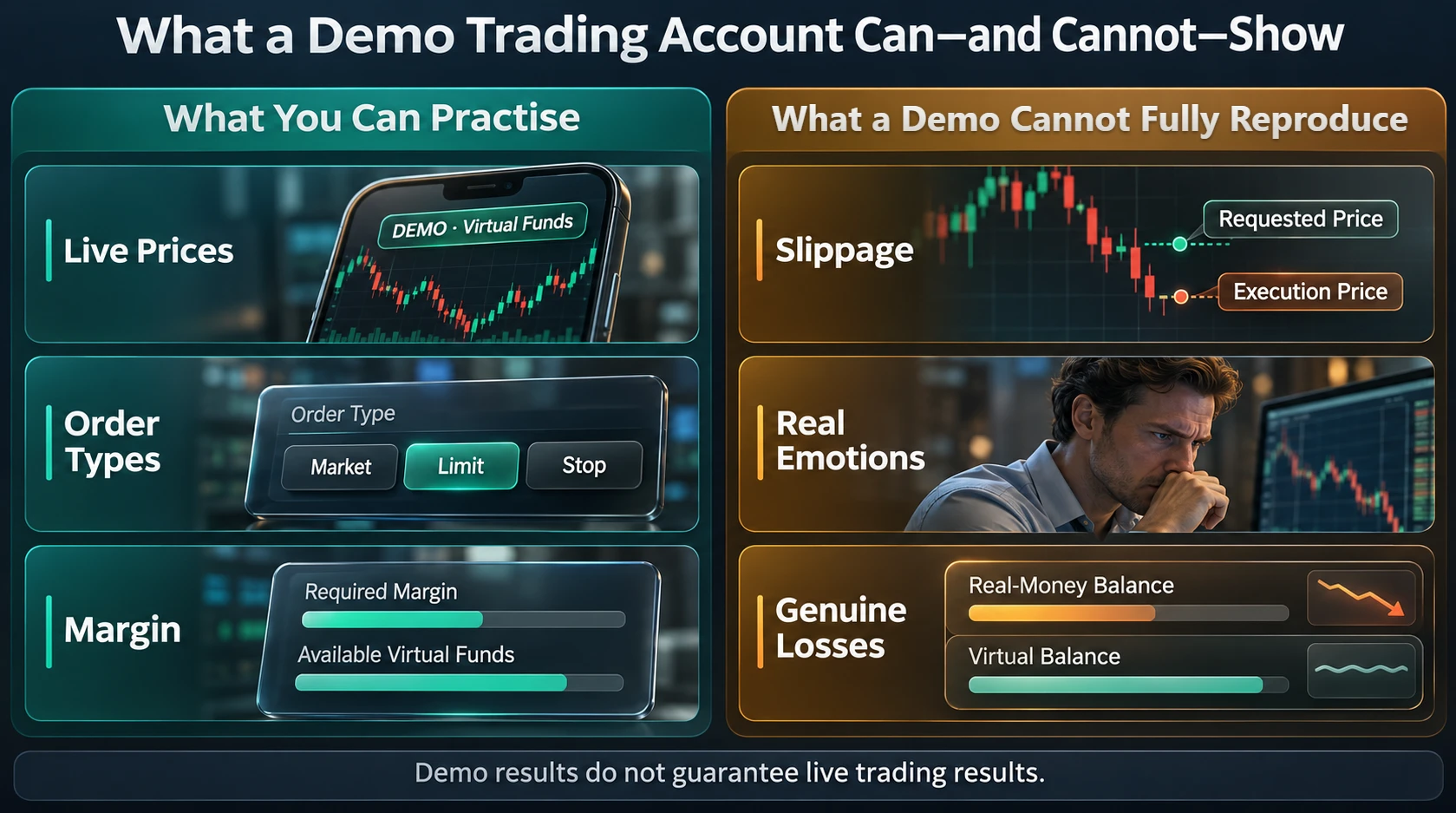
On a paper trading app, you open and close positions using virtual funds, and your balance moves as prices change. Nothing you do affects your own money, which is the point: you can make mistakes while learning how orders, stops and margin work.
Some things are hard to reproduce, however.
- Fills May Differ: Demo orders can fill more smoothly than live ones, because slippage and rejected orders are not always simulated.
- The Pressure Is Missing: Watching a virtual loss is not the same as watching your savings shrink, so decisions can change once real money is at stake.
- Nothing Carries Over: Virtual gains are never paid out, and a strategy that worked on a demo can still lose money on a live account.
Our Comparison Criteria
- Starting Balance: The virtual amount you receive and the currency it is held in.
- Refilling Funds: Whether you can top up or reset the balance yourself.
- Time Limit: How long the demo stays open, and whether that changes once you have a live account.
- Platform Match: Whether the demo runs on the same app or software as a live account.
- Practice Tools: Extras like a replay mode for stepping through old charts.
- Devices: Whether the demo works on iOS, Android and the web.
1. Vantage
Vantage’s UK demo provides up to $100,000 in virtual funds, and you can hold the account in USD, GBP, EUR or HKD. You can practise on MT4 or MT5, and the Vantage UK App also has a demo mode with $100,000 in virtual credit.
- Self-Service Top-Ups: If you run the balance down, you can refill it from the Reset Balance column in the client portal by entering an amount and confirming it, with no support request needed.
- Demo Length: A standard demo lasts 30 days. Clients with a live account can keep a demo with no expiry.
- Spread Betting and CFDs: Vantage UK offers both products on MT4, MT5 and the UK App, so you can learn the platform you would use for either.
2. CMC Markets
CMC Markets gives UK demo users £10,000 in virtual funds and lets you keep the demo open for as long as you like, including after you open a live account [1]. If the balance runs low, you can add funds at any time from the Funding menu [1].
One detail to note: prices for UK shares in the demo are available for up to a calendar month after you activate the price-data subscription [1].
3. IG
IG’s UK demo starts with a preset balance of £10,000 in virtual funds [3], and IG says you can top it up at any point [4]. Because IG offers spread betting and CFDs, UK users can practise either product in pounds, on IG’s web platform, and IG also offers a separate MT4 demo [3].
4. eToro
eToro loads $100,000 of virtual funds into a separate virtual portfolio, and you can switch between that and your real portfolio from the menu under your username [5]. You can trial a trade idea on the practice side first, then decide whether it belongs on the real one.
5. XTB
XTB’s demo remains active for as long as your agreement with XTB is in place, and each client gets one demo account, held in GBP [6]. The demo has to be opened in the XTB mobile app [6].
You can change the demo balance from Client Office under My Accounts [6].
6. TradingView Paper Trading
TradingView’s built-in Paper Trading simulator is available to every TradingView user [7]. You can reset an account and choose a new currency, but a reset wipes the account’s past transactions along with any working orders and positions, so note down what you want to keep first [8].
Its main practice tool is Bar Replay, which steps through historical price action so you can see how a setup would have unfolded. TradingView’s pricing page shows Bar Replay on all plans, including the free Basic plan, for daily and higher timeframes, while minute-by-minute replay comes with paid plans [9]. How far back intraday replay goes depends on your subscription [10].
TradingView is not a broker, so paper trades will not reflect a specific firm’s spread betting or CFD pricing.
Opening a Demo on MT5 Mobile
If your broker supports MetaTrader, you can open a demo directly from the MT5 app. MetaQuotes’ steps are to search for the broker’s server, choose a demo account, enter your details and then pick the account type, hedging or netting, leverage and deposit amount [11][12].
The broker whose server you pick decides which markets appear and how long the demo lasts, so check its terms.
Making Demo Practice Count
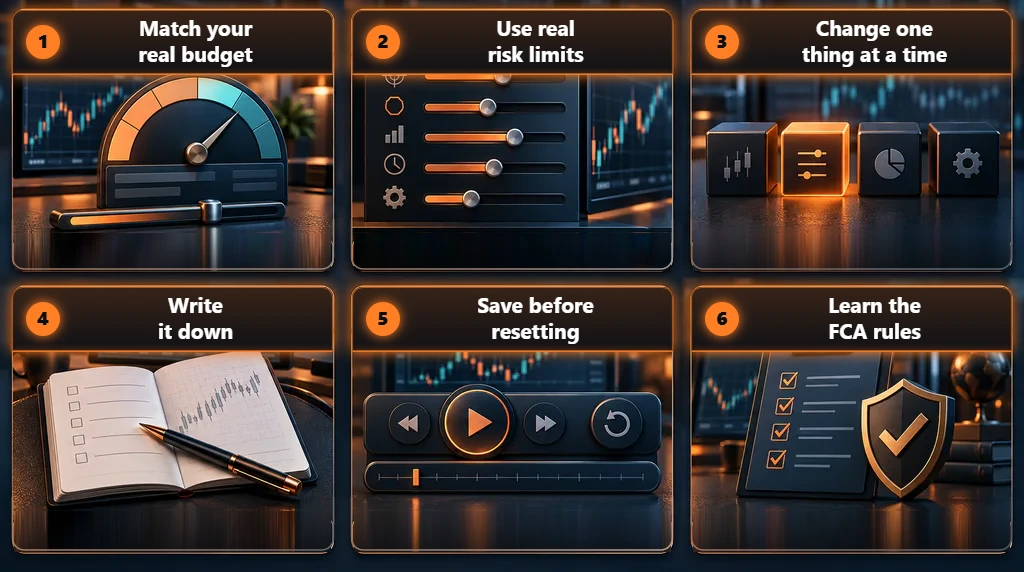
How you practise matters as much as where.
- Match Your Real Budget: Set or top up the balance to roughly what you would actually deposit. Practising with $100,000 when you plan to fund £1,000 can make large positions feel normal.
- Use Real Risk Limits: Trade the size you could genuinely afford and put your stop where you would put it on a funded account.
- Change One Thing at a Time: Adjust a single rule, such as your entry trigger, so you can see what made the difference.
- Write It Down: Log the reason for each entry, where the stop sat and how you felt once the position went into loss.
- Save Before Resetting: Some apps wipe your history on reset, so export or copy your notes first.
- Learn the FCA Rules: Before going live, understand how the 50% margin close-out and leverage limits for retail clients work, as a demo may not show them under real conditions [13].
Finding a Paper Trading App That Suits Your Practice
Your choice of demo should follow the skill you are building. If you need time, CMC Markets’ open-ended demo or a Vantage demo linked to a live account removes the deadline. If you want to test ideas on past charts, TradingView’s replay tools help. If you already know which broker you plan to use, practising in its own app means learning the screens you will actually trade on.
To see how Vantage’s virtual balance and self-service top-ups work, visit our demo account page.
Live CFD trading and spread betting use leverage, which can magnify both gains and losses, and demo results do not indicate exactly how a live account will perform.
FAQs: Paper Trading Apps in the UK
Below are answers to questions UK traders often ask about demo accounts.
Which paper trading app should a UK beginner try first?
It depends on how you like to learn. Many beginners prefer to rehearse inside the app they expect to trade on. Vantage offers up to $100,000 in virtual funds you can top up yourself, while CMC Markets and IG provide £10,000 demos in pounds [1][3]. Testing two or three demos side by side shows quickly which layout you find easiest to follow.
Can I practise spread betting on a demo account?
With some brokers, yes. IG’s UK demo covers spread betting as well as CFDs [3], and CMC Markets also offers spread betting to UK clients [2]. Spread bets are leveraged in the same way as CFDs, so practising position sizing on a demo is useful before you risk real money.
Do UK demo accounts expire?
It varies. Vantage demos close after 30 days unless you also hold a live account, in which case the demo can stay open. CMC Markets lets you keep its demo open for as long as you like [1], and XTB’s demo stays active for the length of your XTB agreement [6]. On MetaTrader, the broker whose server you choose sets the rules, so check before starting a long test.
Can I top up or reset a demo balance?
Usually, though the method differs. Vantage lets you refill your balance from the Reset Balance column in its client portal. CMC Markets has an Add Funds option [1], IG lets you top up at any point [4] and XTB offers Change Balance in Client Office [6]. TradingView’s reset also clears your history [8].
Are demo prices the same as live prices?
Often they track live markets, but a demo is still a simulation. Demo orders may not experience slippage, rejected orders or financing charges in the same way as live trades. Use demo results to learn how an app and strategy behave, and expect live outcomes to differ.
Is paper trading on TradingView enough before trading with a UK broker?
It is a useful start, especially with Bar Replay for historical practice [9]. However, TradingView paper trades do not reflect a UK broker’s spread betting or CFD pricing, margin rules or account terms. Many traders practise ideas on TradingView and then also use the demo of the broker they plan to join, so they learn its screens before going live.
References
- Demo Trading Account FAQs – CMC Markets https://www.cmcmarkets.com/en-gb/support/faqs/demo-account Accessed on 26 November 2026
- Trading Demo Account | Practise Account – CMC Markets https://www.cmcmarkets.com/en-gb/demo-account Accessed on 26 November 2026
- Demo Trading Account: Try IG’s Paper Trading Simulator – IG UK https://www.ig.com/uk/demo-account Accessed on 26 November 2026
- Common questions relating to demo trading – IG UK https://www.ig.com/uk/learn-to-trade/ig-academy/tools-for-traders/common-questions Accessed on 26 November 2026
- Demo Trading Account | Practise investing for free – eToro https://www.etoro.com/trading/demo-account/ Accessed on 26 November 2026
- How to open a demo account – XTB https://www.xtb.com/en/help-center/trading-account/how-to-open-a-demo-account Accessed on 26 November 2026
- Paper trading: main functionality – TradingView https://www.tradingview.com/support/solutions/43000516466-paper-trading-main-functionality/ Accessed on 26 November 2026
- How to change the account currency in Paper Trading – TradingView https://www.tradingview.com/support/solutions/43000480903-how-to-change-the-account-currency-in-paper-trading/ Accessed on 26 November 2026
- TradingView Subscriptions: Pricing and Features – TradingView https://www.tradingview.com/pricing/ Accessed on 26 November 2026
- How much data is available for Bar Replay? – TradingView https://www.tradingview.com/support/solutions/43000692816-how-much-data-is-available-for-bar-replay/ Accessed on 26 November 2026
- Demo Account Opening – MetaTrader 5 for iPhone – MetaQuotes https://www.metatrader5.com/en/mobile-trading/iphone/help/settings_accounts/account_open Accessed on 26 November 2026
- Demo Account Opening – MetaTrader 5 for Android – MetaQuotes https://www.metatrader5.com/en/mobile-trading/android/help/settings_accounts/account_open Accessed on 26 November 2026
- PS19/18: Restricting contract for difference products sold to retail clients – FCA https://www.fca.org.uk/publications/policy-statements/ps19-18-restricting-contract-difference-products-sold-retail-clients Accessed on 26 November 2026
RISK WARNING: CFDs and Spread Bets are complex instruments and come with a high risk of losing money rapidly due to leverage. 72.65% of retail investor accounts lose money when trading CFDs and Spread Bets with this provider. You should consider whether you understand how CFDs and Spread Bets work and whether you can afford to take the high risk of losing your money.
Demo account results are simulated and do not guarantee results on a live account.
Disclaimer: The information is provided for educational purposes only and doesn’t take into account your personal objectives, financial circumstances, or needs. It does not constitute investment advice. We encourage you to seek independent advice if necessary. The information has not been prepared in accordance with legal requirements designed to promote the independence of investment research. No representation or warranty is given as to the accuracy or completeness of any information contained within. This material may contain historical or past performance figures and should not be relied on. Furthermore estimates, forward-looking statements, and forecasts cannot be guaranteed. The information on this site and the products and services offered are not intended for distribution to any person in any country or jurisdiction where such distribution or use would be contrary to local law or regulation.
Editorial Disclosure: This guide is published by Vantage. Vantage products are included in this comparison. The rankings reflect our editorial assessment based on the criteria described below and are intended for informational purposes only. They are not an independent ranking or a personal recommendation.
Key Points In This Article

Latest Academy Articles


Market News Tags
- # Asian Markets News Today
- # Crude Oil News Today
- # Earnings News Today
- # Economic News Today
- # Featured News
- # Federal Reserve News
- # Commodity Market News
- # Interest Rate News
- # Financial News
- # Forex News Today
- # Gold News Today
- # Market News Today
Related Articles
- 5 Bank Stocks in Focus for 2026: Sector Outlook, Key Themes, and Market Drivers
- Dell Stock Overview: A Look at Dell Technologies Inc
- Swipe Right And Discover 3 Dating App Stocks in the UK
- Trading Central Bank Announcements in Forex: Capitalising on Market Reactions
- AI Bubble or Healthy Correction? What UK Traders Should Watch Into 2027
- NVIDIA (NASDAQ: NVDA) Stock Outlook for UK Traders: Latest Earnings, Analyst Ratings, and Trading Hours
- Herd Mentality in Trading: Worked Examples and How to Avoid It
- How to Calculate Gold Pips (XAUUSD) in the UK: Pip Value Guide With Examples