

 Login
Login






 Updated
MetaTrader 4 (MT4) is a powerful trading platform designed for forex and CFD trading. With Vantage, you can easily download, set up, and start trading on MT4, taking advantage of its wide range of features, from technical analysis tools to automated trading options. This guide will help you get started with MT4 and explore its key functionalities.
Key Points
- MT4 is a popular trading platform known for its simplicity and powerful features, primarily designed for forex and CFD trading.
- With Vantage, you can easily download and set up MT4, create a trading account, and start executing trades using intuitive tools and options.
- MT4 allows you to open, monitor, and manage trades efficiently, providing key features like customisable orders, technical indicators, and risk management tools.
What is MetaTrader 4
MT4 is one of the world’s most popular trading platforms, widely known for its user-friendly interface and robust features. Launched in 2005 by MetaQuotes, MT4 primarily caters to forex trading but also supports commodities and indices via Contracts for Difference (CFDs). It offers traders a straightforward platform to analyse the markets, execute trades, and manage their portfolios efficiently.
MT4 stands out due to its simplicity, making it a great choice for beginners. However, it also provides advanced trading tools such as technical indicators, charting features, and automated trading scripts known as Expert Advisors (EAs). This balance of accessibility and functionality is why it remains a favourite among traders worldwide, despite the introduction of its successor, MetaTrader 5 (MT5).
How to Use MetaTrader 4 with Vantage
This section will guide you through downloading, installing, and creating an account on MT4, as well as opening and managing trades:
Download MT4 Software
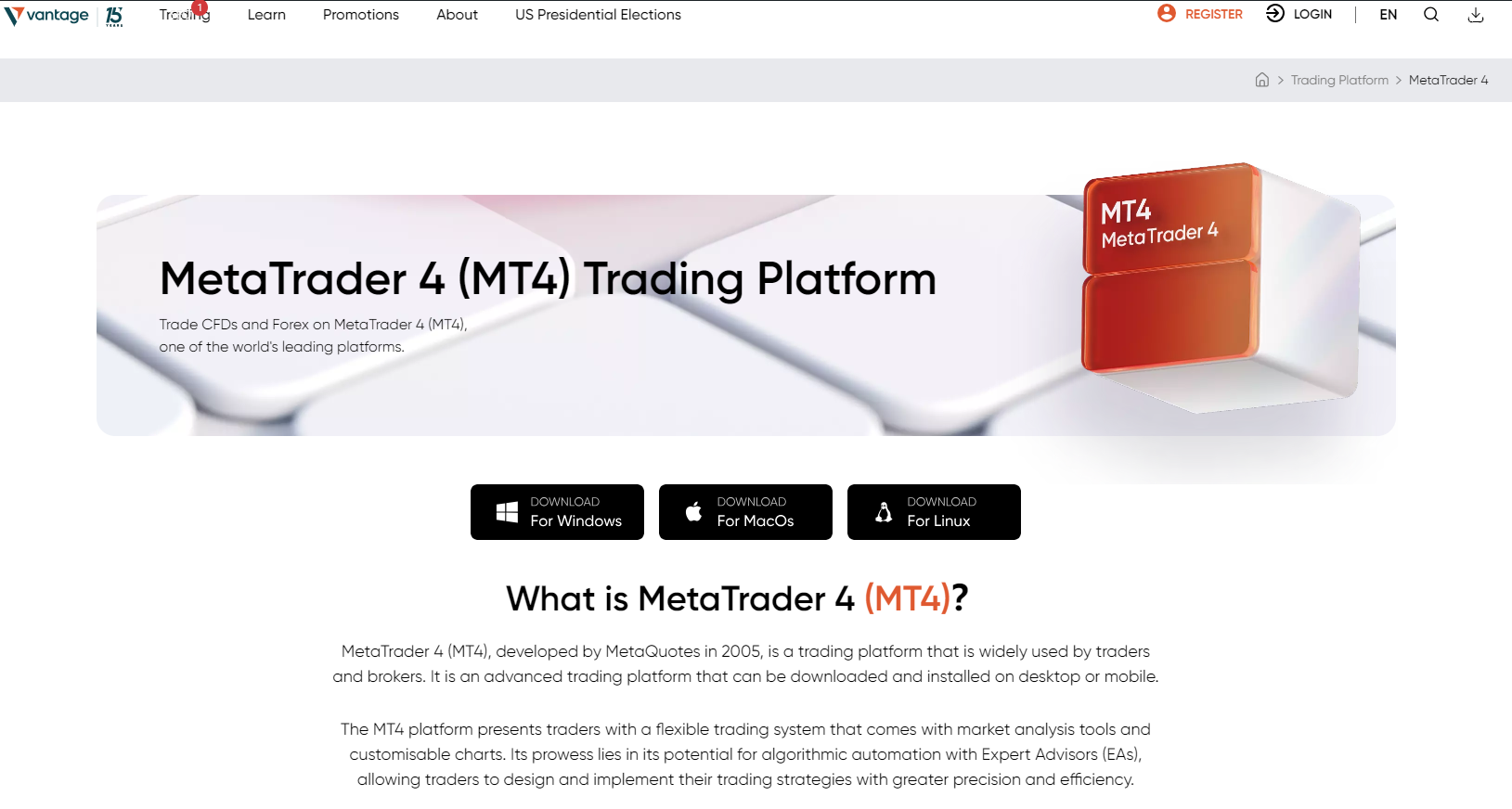
To begin using MT4, you’ll need to download the platform from Vantage’s website:
1. Go to Vantage’s official website.
2. Navigate to the Platforms section and choose MetaTrader 4.
Run the Setup and Complete Installation
After the download is complete:
1. Open the downloaded file to start the installation process.
2. Approve any requested changes to your device and accept the Licence Agreement.
3. Follow the on-screen prompts to select your installation settings.
4. Click “Next” to finalise the installation.
Once completed, MetaTrader 4 will launch automatically, or you can open it from your desktop.
Create a MetaTrader 4 account
You’ll need a trading account to get started with MT4:
1. Visit Vantage’s website and hover over the “Register” button in the top-right corner.
2. Choose “Trade Now” to open a live account or “Practice Trading” to create a demo account.
3. Follow the on-screen instructions to enter your details and submit the necessary documents for verification.
4. Once your account is verified and funded, you’ll receive your login credentials.
Use these credentials to log into MT4 and start exploring the platform.
Open a position on the market
Opening a position on the market with MT4 is straightforward. You can either use the trading sub-menu for a quick trade or the main toolbar to enter a new position.
Step 1: Choose a Currency Pair
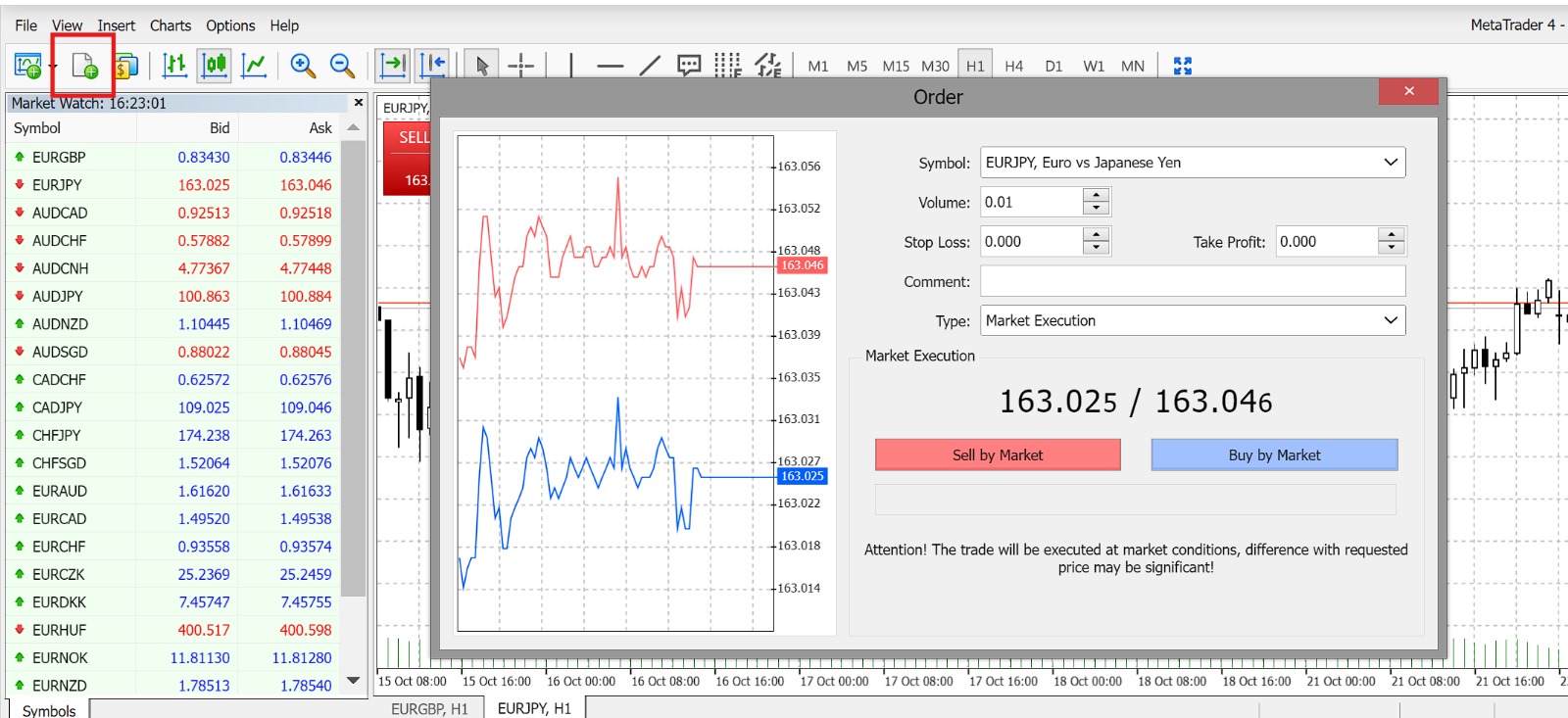
In the Market Watch section on the left, find and select the currency pair you want to trade. Click the “New Order” icon to open the order sub-menu.
Step 2: Set Up Your Trade
In the order window, specify your trade volume, and if necessary, set your stop-loss and take-profit levels. Then, choose between a “Market Order” to execute immediately at the current price or a “Pending Order” to be triggered when the market reaches a certain price.
Step 3: Configure Pending Orders
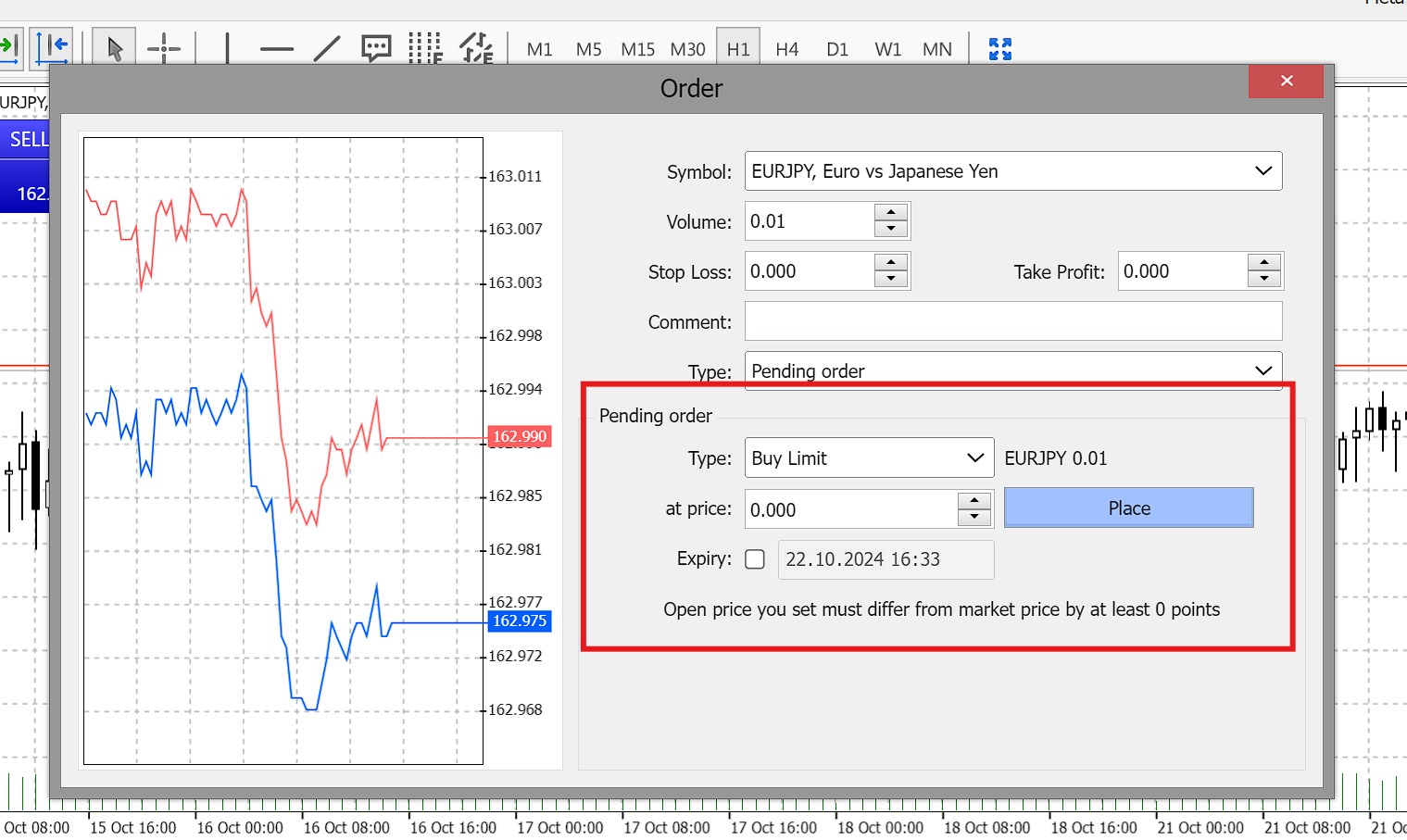
If you select a Pending Order, additional fields will appear, allowing you to choose an order type (Buy Limit, Sell Limit, Buy Stop, or Sell Stop) and input your target price. You can also set an expiry date for the order.
Step 4: Confirm Your Trade
Once everything is set, click the “Place” button to submit your order. Your trade will be executed when the conditions you’ve specified are met.
Monitor and close your positions
Managing your active trades on MT4 WebTrader is simple. To keep track of your positions, click “View” in the top toolbar and select “Toolbox.” This will open the Toolbox panel at the bottom of the screen.
Step 1: Monitor Your Trades
In the Toolbox panel, navigate to the “Trade” tab to see a list of all your active and pending orders. This tab shows key details like trade volume, entry price, and current profit/loss.
Step 2: Modify or Close a Position
To make changes, right-click on the position you want to adjust and select “Modify or Delete.” This will open an order window where you can update your trade parameters or close it. To close a position, you can also click the “X” button next to the order in the “Trade” tab.
Consistently monitoring and adjusting your trades is part and parcel of effective risk management and optimising your trading strategy.
Conclusion
MT4 with Vantage offers a comprehensive yet user-friendly trading experience for both beginners and experienced traders. By following this guide, you can easily download and install the platform, set up a trading account, open and manage positions, and monitor your trades effectively.
Start by practising with a demo account to familiarise yourself with the platform, and when you’re ready, explore the wide range of markets available on a live account with Vantage.
CFDs and Spreadbets are complex instruments and come with a high risk of losing money rapidly due to leverage. 68.4% of retail investor accounts lose money when trading CFDs and Spreadbets with this provider. You should consider whether you understand how CFDs and Spreadbets work and whether you can afford to take the high risk of losing your money. The information has been prepared by Vantage UK as of 24 June 2025 and is subject to change thereafter. The information is provided for educational purposes only and doesn’t take into account your personal objectives, financial circumstances, or needs. It does not constitute investment advice. We encourage you to seek independent advice if necessary.
The information has not been prepared in accordance with legal requirements designed to promote the independence of investment research. No representation or warranty is given as to the accuracy or completeness of any information contained within. This material may contain historical or past performance figures and should not be relied on. Furthermore estimates, forward-looking statements, and forecasts cannot be guaranteed. The information on this site and the products and services offered are not intended for distribution to any person in any country or jurisdiction where such distribution or use would be contrary to local law or regulation.
Vantage is a trading name of Vantage Global Prime LLP which is authorised and regulated by the Financial Conduct Authority. FRN: 590299
The information has been prepared as of the date published and is subject to change thereafter. The information is provided for educational purposes only and doesn't take into account your personal objectives, financial circumstances, or needs. It does not constitute investment advice. We encourage you to seek independent advice if necessary. The information has not been prepared in accordance with legal requirements designed to promote the independence of investment research. No representation or warranty is given as to the accuracy or completeness of any information contained within. This material may contain historical or past performance figures and should not be relied on. Furthermore estimates, forward-looking statements, and forecasts cannot be guaranteed. The information on this site and the products and services offered are not intended for distribution to any person in any country or jurisdiction where such distribution or use would be contrary to local law or regulation.